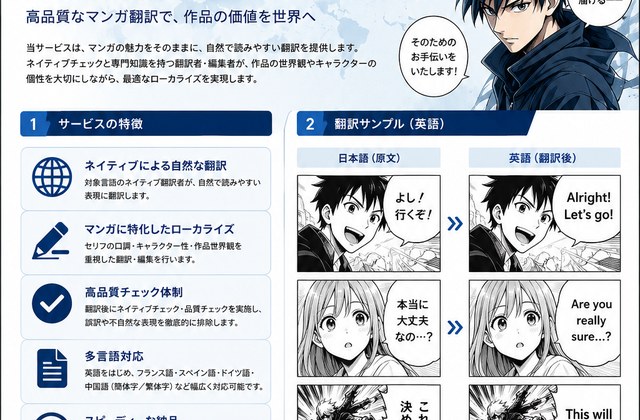
Manga translation proposal
A proposal-style flyer with manga panels, icons, and section cards.
 WorldScene
Free beta tool
Convert AI-generated images, screenshots, diagrams, and mockups into editable PPTX slides.
Unlike tools that redesign your image into a new deck, Drop2PPT keeps the original look and rebuilds it as editable PowerPoint objects.
Use the login and sign up buttons in the header to manage your account.
Credits are not pooled: Starter / Pro adds standard credits, while High Quality adds high-quality credits. Select the matching conversion mode before uploading.
| Feature | Starter / Pro | High Quality |
|---|---|---|
| Credit wallet | Consumes standard credits bought with Starter or Pro | Consumes High Quality credits only |
| Best for | Simple drafts, screenshots, and ordinary slide images | Dense AI-generated infographics, client deliverables, and complex diagrams |
| Reconstruction | Text, panels, arrows, and layout are rebuilt as editable objects; necessary photos and logos may remain as images | More detailed editable reconstruction with closer placement, font choices, and visual-region decisions |
| Image preservation | Keeps only necessary photos, logos, QR codes, product images, and detailed screenshots as images | Selects image regions more carefully for photos, logos, charts, screenshots, textures, and complex visuals |
High Quality samples
Download the source image and the PPTX rebuilt with High Quality mode. Use them to judge fit before purchasing.
A proposal-style flyer with manga panels, icons, and section cards.

A B2B landing-page brochure with photos, panels, and CTA sections.
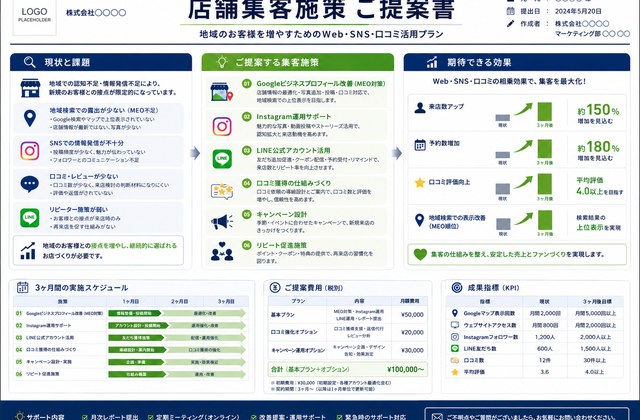
A local marketing proposal with schedules, KPIs, icons, and comparison panels.
High Quality improves reconstruction, but perfect reproduction and editability are not guaranteed. Photos, logos, screenshots, and very detailed visuals may remain as images.
Direct answer
Drop2PPT is a free beta web tool that turns AI-generated images, screenshots, diagrams, and mockups into editable PowerPoint PPTX slides. It is designed for people who need a presentation file, not just a flat image.
How it works
The goal is to rebuild text, panels, arrows, and layout as PowerPoint elements you can edit.
Drop an AI image, screenshot, diagram, or mockup.
Analyze the layout and reconstruct it as editable slide objects.
Get a PPTX file you can revise, present, and deliver.
WorldScene apps

Receive shared images or PDFs and send them into Android print flow.
Open on Google Play
FAQ
Drop2PPT converts AI-generated images, screenshots, diagrams, and mockups into editable PowerPoint PPTX slides.
No. The goal is to rebuild text, shapes, panels, arrows, and layout as editable PowerPoint elements instead of placing a single flat image on a slide.
It is for marketers, consultants, planners, creators, educators, and teams that need to turn visual drafts into editable presentation files.
PNG, JPG, and WebP images up to 12 MB are supported. Convert one image at a time.
Policy and support